4. 消息时序图

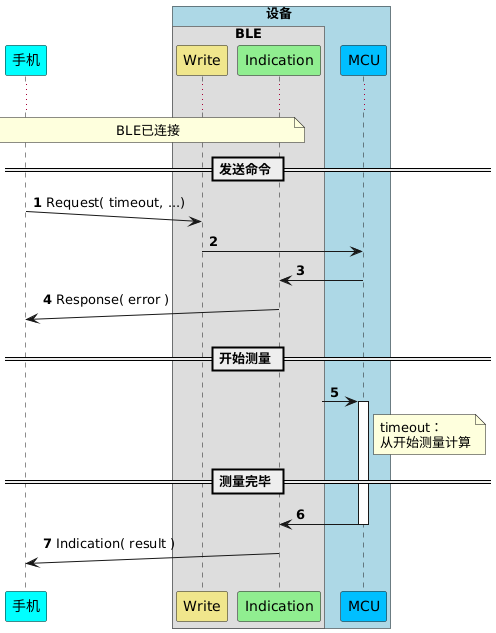
以下列举来正常和异常的时序图

4.1. 正常通信消息时序图

!pragma teoz true
participant 手机 as P #cyan
box 设备 #LightBlue
box BLE
participant Write as W #khaki
participant Indication as I  #lightgreen
end box
participant MCU as M #deepskyblue
end box

autonumber
...
note over P,I: BLE已连接
== 发送命令 ==

P ->(10) W : Request( timeout, ...)
W -> M :
M -> I :
P (10)<- I : Response( error )

== 开始测量 ==
?-> M ++ :
note right of M
    timeout:
    从开始测量计算
end note
== 测量完毕 ==
M -> I -- :
P (10)<- I : Indication( result )

4.2. 异常通信消息时序图

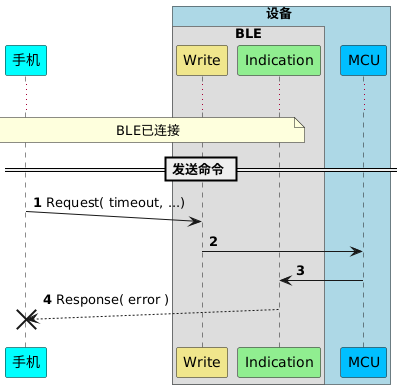
4.2.1. 未收到Response

如果手机在 1秒 内没有收到response,那么可以认为命令发送失败。

!pragma teoz true
participant 手机 as P #cyan
box 设备 #LightBlue
box BLE
participant Write as W #khaki
participant Indication as I  #lightgreen
end box
participant MCU as M #deepskyblue
end box

autonumber
...
note over P,I: BLE已连接
== 发送命令 ==

P ->(10) W : Request( timeout, ...)
W -> M :
M -> I :
P (10)<-- I !! : Response( error )

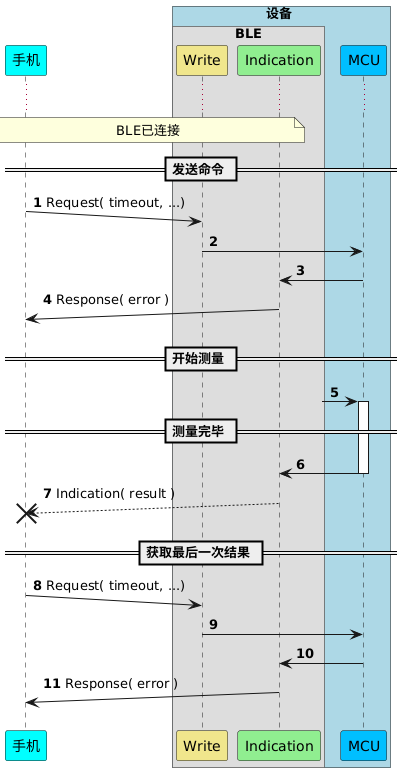
4.2.2. 未收到测试结果

如果手机在设置的timeout时间内未收到Indication,可以认为结果丢失,发送Request获取最后一次结果。
!pragma teoz true
participant 手机 as P #cyan
box 设备 #LightBlue
box BLE
participant Write as W #khaki
participant Indication as I  #lightgreen
end box
participant MCU as M #deepskyblue
end box

autonumber
...
note over P,I: BLE已连接
== 发送命令 ==
P ->(10) W : Request( timeout, ...)
W -> M :
M -> I :
P (10)<- I : Response( error )

== 开始测量 ==
?-> M ++ :

== 测量完毕 ==
I <- M -- :
P (10)<-- I !! : Indication( result )

== 获取最后一次结果 ==
P ->(10) W : Request( timeout, ...)
W -> M :
M -> I :
P (10)<- I : Response( error )